I am trying to power 15 RGB LED's with an Arduino Pro Micro but whenever the VCC is connected the Arduino doesn't power on at all. As soon as I remove the VCC, it powers on and is recognised by the PC.
The LED strip is wired correctly, in's match with outs, all grounds and powers are connected.
I really can't work out what the issue is and I can't find anyone else with this issue after an extensive google search.
For the 5V version:
What I suspect (not 100% sure) that happens is that you're feeding back 5V (from Vcc) into the USB of your PC; the PC probably does not like that. Have a look at the schematic; maybe cutting SJ1 will solve the issue. In that case, you will always have to keep it powered via Vcc.
What is the motivation to apply Vcc? Stand alone usage?
The voltage is just via the USB from the computer?
Which ProMicro? 5V or 3.3V version?
It is a 3.3V version.
I am making a wheel for sim racing and this will power the RPM LED's. The J1 was not joined and I tried joining it but there was no difference. I have three micro pro's and all 3 do the same.
I have attached a 7 segment clock display using the VCC and this works fine. I have also tried another 8 segment LED RGB strip and that worked ok too.
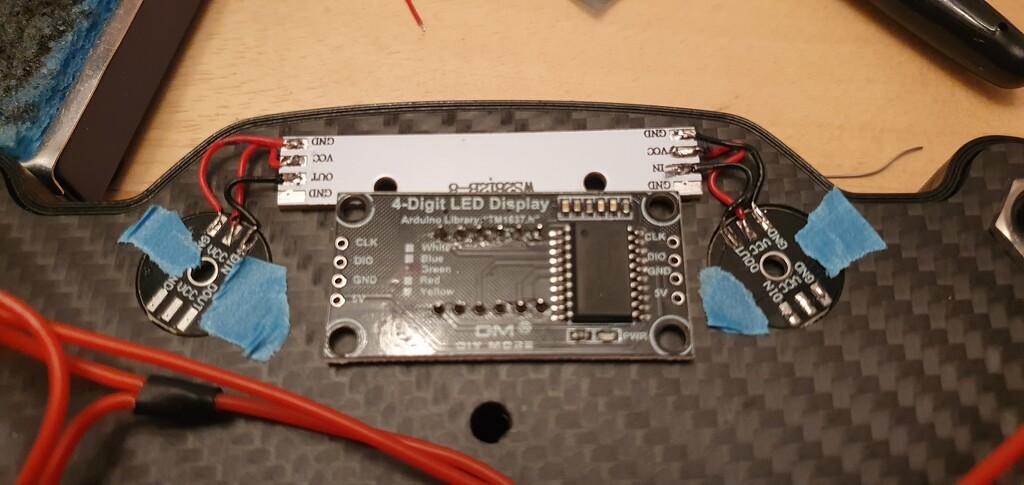
I now believe it is an issue with the LED boards in some way but I am not sure what. I have 3 of them daisy chained together all wired to the correct in's and out's, VCC , GND etc, however even I un-solder them and just use one LED board. I get the same issue.
I have tried powering them this morning with an external supply straight on to the LED's but get odd results.
On one of them nothing lights up. On the two that are still daisy chained, If I put 4v though the in side, one LED lights on the second board, right at the end (very dull). If I go to the other end and do the same, the other board lights.
I asked to draw. Not sure what those little round disks are that are connected to the led strip?
Anyway, you're are probably drawing to much power from the voltage regultor on the ProMicro; for this setup I suggest a separate power supply.
And WS2812B basically requires 5V, not 3.3V. The often suggested solution is a 74HC14 as a level shifter (two ports of it in series so you don't end up with an inverted signal; never had a need myself as I don't control my WS2812B from a 3.3V ProMicro.
The round discs have 3 RGB LED's on the front, same spec as the main one in the middle.
I have seen other builds where they have linked together 3 of the 8 LED RGB boards and powered them through a Pro Micro?
I don't think it is an issue with the Arduino board now, I think it is the RGB boards themselves as they don't even seem to work when powered through a power supply directly to the board.
OK, possibly a 5V ProMicro where the voltage regulator is bypassed. That means that the power comes directly from the USB, not from the tiny voltage regulator.
And leds not set to maximum brightness. 8 WS2812B leds at full white draw roughly 8 x 60 mA = 480 mA.
bengri:
On one of them nothing lights up. On the two that are still daisy chained, If I put 4v though the in side, one LED lights on the second board, right at the end (very dull). If I go to the other end and do the same, the other board lights.
Do you understand how WS2812B chips work? You need to send a serial signal; a fixed 4V to Din will basically do nothing.
Something I have now discovered is that the round 3bit board, has 6 pins on each RGB and the 8bit straight board has 4 pins. From a google search, this seems to be the difference between WS2812B and WS2812?
My question is, can you use a board with WS2812B's and one with WS2812 within the same power/signal chain? Or will this not work and kill something?
I have since tried each board individually, one of the round ones and the strip is totally dead, The other round one only two of the lights work. the one RGB closest to the "out" does nothing.
I had another spare 8 bit board with WS2812B's and this worked exactly as it is meant to. It's definitely not a power supply issue on the Arduino side but possibly a fault or shorting out within one of the three LED boards or the fact different types were mixed?
That was me, it was my original issue but this is a different query to do with mixing the different RGB types. Thought the question would be lost if I posted it in the original thread.
I didn't personally class it as a cross post/duplicate as it was a different query/question. I believe I have solved the first issue and this was a different question.
OK, the point is, it was the same project with the same configuration, it is by no means clear from, your replies that the original problem was solved or indeed that the new concern was not actually related.
bengri:
Thought the question would be lost if I posted it in the original thread.
Why would you think that? Do you think people get bored with your problem?
The whole point of posting your problems here, is that in order to help you , people need to know as much as possible about the context of your problem and the context includes everything you have previously revealed - and just as likely, something you haven't.
Paul__B:
Why would you think that? Do you think people get bored with your problem?
Not implying people get bored. "Why would you think that?" :o
However, someone who viewed it originally but didn't have any answers or ideas what the first issue was, could potentially know the answer to my second question/issue but they don't come back to view the post again. Hence my knew post based around a different query.

 Do you think people get bored with your problem?