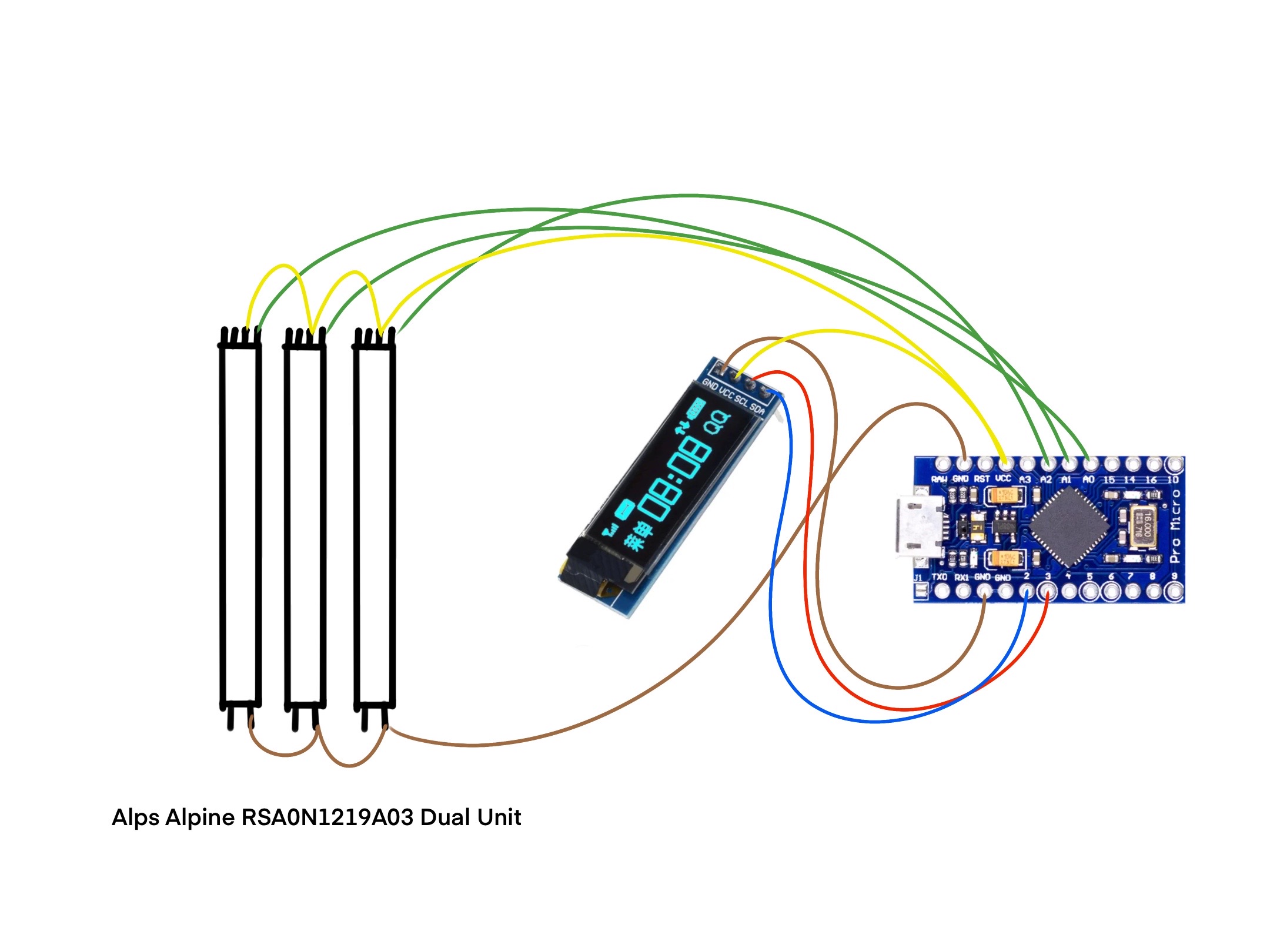
Nah dont have a Multimeter, Will need to pick one up soon though.
Exact Model Of Fader and Spec's Below in the page below
CODE BELOW:
#include "MIDIUSB.h" // Include the MIDIUSB library for MIDI Communication
#include <ResponsiveAnalogRead.h>

#include <Wire.h>
#include <Adafruit_GFX.h>
#include <Adafruit_SSD1306.h>

// Define pins for OLED display
#define OLED_RESET 4
#define SCREEN_WIDTH 128
#define SCREEN_HEIGHT 32

// Initialize OLED display
Adafruit_SSD1306 display(SCREEN_WIDTH, SCREEN_HEIGHT, &Wire, OLED_RESET);

// Define MIDI channel
#define MIDI_CHANNEL 1

// Define analog input pins
#define DYN A0
#define EXP A1
#define VIB A2


#define LOGO_HEIGHT   16;
#define LOGO_WIDTH    16;


// Fader Pin & State
const int N_POTS = 3;

int potPin[N_POTS] = { A0, A1, A2 };
int potCC[N_POTS] = { 11, 1, 21 };

int potReading[N_POTS] = { 0 };
int potState[N_POTS] = { 0 };
int potPState[N_POTS] = { 0 };

int midiState[N_POTS] = { 0 };
int midiPState[N_POTS] = { 0 };

const byte potThreshold = 15;
const int POT_TIMEOUT = 300;
unsigned long pPotTime[N_POTS] = {0};
unsigned long potTimer[N_POTS] = {0};

byte POT_CH = 0;

float snapMultiplier = 0.01;
ResponsiveAnalogRead responsivePot[N_POTS] = {};

void setup() {
  // TEXT DISPLAY
  ;display.clearDisplay();
  ;display.setTextSize(2);
  ;display.setTextColor(WHITE);
  ;display.setCursor(4,30);
  ;display.print("Lothrian-3");
  ;display.display();
  Serial.begin(9600);

  for(int i = 0; i <N_POTS; i++) {
    responsivePot[i] = ResponsiveAnalogRead(0, true, snapMultiplier);
    responsivePot[i].setAnalogResolution(1023);

  // Initialize serial communication
  Serial.begin(9600);

  // Initialize OLED display
  display.begin(SSD1306_SWITCHCAPVCC, 0x3C);
  display.clearDisplay();

  // Set text size and color for display
  display.setTextSize(2);
  display.setTextColor(WHITE);

  }
}

void loop() {
  // put your main code here, to run repeatedly:


  for (int i = 0; i < N_POTS; i++) {

    potReading[i] = analogRead(potPin[i]);
    responsivePot[i].update(potReading[i]);
    potState[i] = responsivePot[i].getValue();
    midiState[i] = map(potState[i], 0, 1023, 0, 128);

    int potVar = abs(potState[i] - potPState[i]);

    if (potVar > potThreshold) {
      pPotTime[i] = millis();
    }

    potTimer[i] = millis() - pPotTime[i];


if(potTimer[i] < POT_TIMEOUT) {
    if (midiState[i] != midiPState[i]) {

      controlChange(POT_CH, potCC[i], midiState[i]);
      MidiUSB.flush();

      Serial.print("Pot ");
      Serial.print(i);
      Serial.print(" | ");
      Serial.print("potState: ");
      Serial.print(potState[i]);
      Serial.print(" - midiState:");
      Serial.println(midiState[i]);

      midiPState[i] = midiState[i];
     }
    potPState[i] = potState[i];

  // Read analog inputs and map values to MIDI range (0-127)
  int analogValue1 = map(analogRead(DYN), 0, 1023, 0, 127);
  int analogValue2 = map(analogRead(EXP), 0, 1023, 0, 127);
  int analogValue3 = map(analogRead(VIB), 0, 1023, 0, 127);


  // Display analog values on OLED display
  display.clearDisplay();
  display.setCursor(0, 19);
  display.print("EXP ");
  display.setCursor(0, 0);
  display.println(analogValue1);

  display.setCursor(48, 19);
  display.print("DYN ");
  display.setCursor(48, 0);
  display.println(analogValue2);

  display.setCursor(92, 19);
  display.print("VIB ");
  display.setCursor(92, 0);
  display.println(analogValue3);
  display.display();

  // Delay for stability
  delay(1);
    }
  }
}


void noteOn(byte channel, byte pitch, byte velocity) {
  midiEventPacket_t noteOn = {0x09, 0x90 | channel, pitch, velocity};
  MidiUSB.sendMIDI(noteOn);
}

void noteOff(byte channel, byte pitch, byte velocity) {
  midiEventPacket_t noteOff = {0x08, 0x80 | channel, pitch, velocity};
  MidiUSB.sendMIDI(noteOff);
}

void controlChange(byte channel, byte control, byte value) {
  midiEventPacket_t event = {0x0B, 0xB0 | channel, control, value};
  MidiUSB.sendMIDI(event);
}