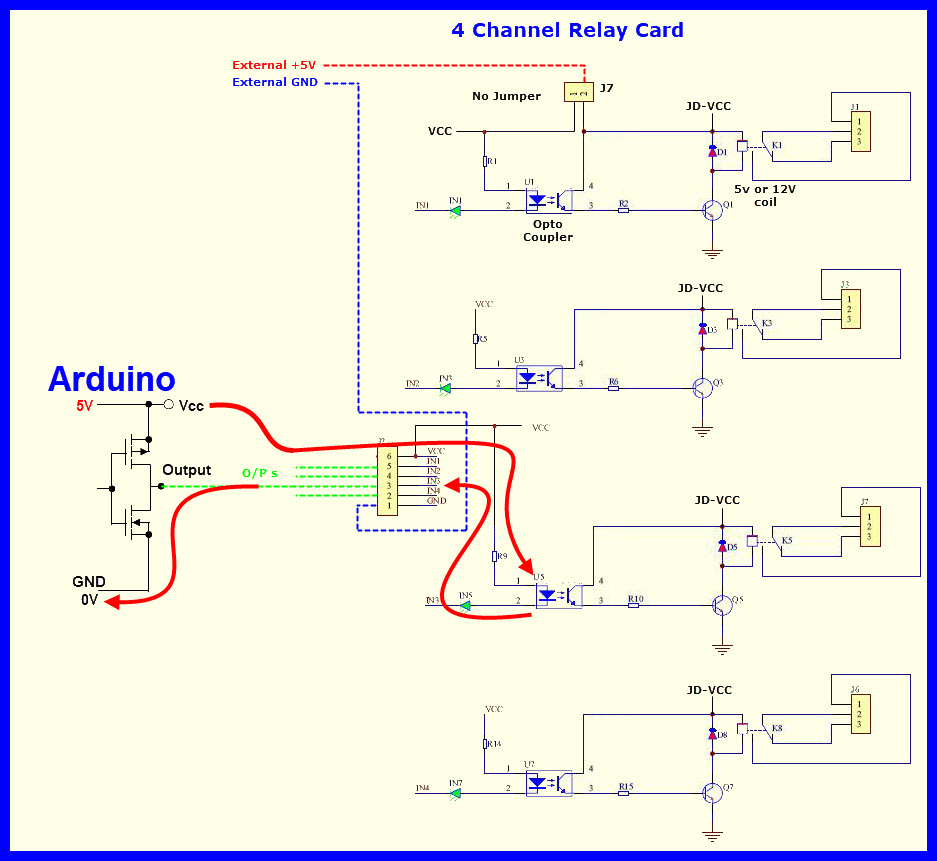
Hello. I want to manage 4 relay module with arduino mega but it is malfunctioning. The code is below, but before the other relays close, it turns on the others, and after 3 seconds, it closes the other 2. When I use the same code to light the led without any changes, it works perfectly. Can anyone help?
int relay1Pin = 2;
int relay2Pin = 3;
int relay3Pin = 4;
int relay4Pin = 5;

void setup() {
  pinMode(relay1Pin, OUTPUT);
  pinMode(relay2Pin, OUTPUT);
  pinMode(relay3Pin, OUTPUT);
  pinMode(relay4Pin, OUTPUT);
}

void loop() {
  digitalWrite(relay1Pin, HIGH);
  digitalWrite(relay2Pin, HIGH);
  delay(10000);
  digitalWrite(relay1Pin, LOW);
  digitalWrite(relay2Pin, LOW);
  delay(5000);

  digitalWrite(relay3Pin, HIGH);
  digitalWrite(relay4Pin, HIGH);
  delay(10000);

  digitalWrite(relay3Pin, LOW);
  digitalWrite(relay4Pin, LOW);
  delay(5000);
}
LarryD
June 13, 2023, 11:07pm
2
Always show us a good schematic of your proposed circuit.your ‘actual’ wiring.
Sorry, i have arduino mega and 4 relay module
i don't know if my relays are running high or low
int relay1Pin = 2;
int relay2Pin = 3;
int relay3Pin = 4;
int relay4Pin = 5;

void setup() {
  pinMode(relay1Pin, OUTPUT);
  //digitalWrite(relay1Pin, HIGH);
  pinMode(relay2Pin, OUTPUT);
  //digitalWrite(relay2Pin, HIGH);
  pinMode(relay3Pin, OUTPUT);
  //digitalWrite(relay3Pin, HIGH);
  pinMode(relay4Pin, OUTPUT);
  //digitalWrite(relay4Pin, HIGH);
}

void loop() {
  digitalWrite(relay1Pin, LOW);
  delay(5000);

  digitalWrite(relay1Pin, HIGH);
  digitalWrite(relay2Pin, LOW);
  delay(5000);

  digitalWrite(relay2Pin, HIGH);
  digitalWrite(relay3Pin, LOW);
  delay(5000);

  digitalWrite(relay3Pin, HIGH);
  digitalWrite(relay4Pin, LOW);
  delay(5000);

  digitalWrite(relay4Pin, HIGH);
}
Hi @kaandagci could you please share a video of what is happening when you run the code?
And I would recommend this troubleshooting method usually Arduino will limit the amount of current(A) it is supplying through the 5V pin you can try connecting the relays to an external 5V power supply with same shared ground
I'm uploading the videos to youtube, I'll post them soon
i did what you said i had an external power card i tried but it still works the same
LarryD
June 14, 2023, 12:01am
11
Show us the wiring connections you tried.
14 Haziran 2023 - YouTube //// this is what happens when i upload the code
14 Haziran 2023 - YouTube //// when i try the same code on leds, i get exactly what i want
Why not try using Arduino Uno and the same jumper cables?
Nano, uno, mega I tried them all, the result is the same, nothing changes…
I saw the video and it looks like you are having Acitve-Low relay where the relay activates when you give LOW and deactivates when you give HIGH so..
you can try this code
int relay1Pin = 2;
int relay2Pin = 3;
int relay3Pin = 4;
int relay4Pin = 5;

void setup() {
  pinMode(relay1Pin, OUTPUT);
  pinMode(relay2Pin, OUTPUT);
  pinMode(relay3Pin, OUTPUT);
  pinMode(relay4Pin, OUTPUT);
  digitalWrite(relay1Pin, HIGH);
  digitalWrite(relay2Pin, HIGH);
  digitalWrite(relay3Pin, HIGH);
  digitalWrite(relay4Pin, HIGH);
}

void loop() {
  digitalWrite(relay1Pin, LOW);
  digitalWrite(relay2Pin, LOW);
  delay(10000);
  digitalWrite(relay1Pin, HIGH);
  digitalWrite(relay2Pin, HIGH);
  delay(5000);

  digitalWrite(relay3Pin, LOW);
  digitalWrite(relay4Pin, LOW);
  delay(10000);

  digitalWrite(relay3Pin, HIGH);
  digitalWrite(relay4Pin, HIGH);
  delay(5000);
}
Did you try any other 4 Channel relay boards?
Did you try the code i have posted? and try changing the jumper cables......
Thank You! this code solve my problem.