Hey,Reddit - Dive into anything
Does anyone know of a good tutorial on how to get an arduino bootloader onto an atmega8? Thanks
jim-p
July 22, 2024, 9:38am
2
If you want to use the Arduino IDE, then I suggest installing MiniCore and using Arduino as ISP to burn the bootloader.
Arduino hardware package for ATmega8, ATmega48, ATmega88, ATmega168, ATmega328 and ATmega328PB - MCUdude/MiniCore
I've tried that too. But i just get this error.
avrdude error: Yikes! Invalid device signature.
Failed chip erase: uploading error: exit status 1
jim-p
July 22, 2024, 10:57am
4
When you tried to burn the bootloader or when you tried to upload a sketch?
When i try to burn the bootloader
jim-p
July 22, 2024, 11:26am
7
That is getting the Board Info of the Uno not the ATmega8 but that is not what you show in post #4
So I ask the same question again, did you get the error while burning the bootloader or while trying to upload a sketch?
Well I'm new to this. But once i set all you see in the pictures. I just press the "burn bootloader" at the bottom of the tools menu and that error comes up. It's been doing my head in since every tutorial i watch once they hit burn bootloader its done
jim-p
July 22, 2024, 11:39am
10
Burning the bootloader to the ATmega8 is the same as doing it for the 328, even the pinout is the same. So any tutorial you find for the 328 should work for the 8
but select ATmega8 as the processor
jim-p
July 22, 2024, 11:54am
11
Next time you try, check the boxes for show verbose output during upload and compilation, it will provide more info.
You've helped a lot i tried again and this is the error out put
"C:\Users\James\AppData\Local\Arduino15\packages\MiniCore\tools\avrdude\7.2-arduino.1/bin/avrdude" "-CC:\Users\James\AppData\Local\Arduino15\packages\MiniCore\hardware\avr\3.0.2/avrdude.conf" -v -patmega8 -cstk500v1 -PCOM6 -b19200 -e -Ulock:w:0xff:m -Uefuse:w:{bootloader.extended_fuses}:m -Uhfuse:w:0b11000111:m -Ulfuse:w:0b10111111:m

avrdude: Version 7.2-arduino.1
         Copyright the AVRDUDE authors;
         see https://github.com/avrdudes/avrdude/blob/main/AUTHORS

         System wide configuration file is C:\Users\James\AppData\Local\Arduino15\packages\MiniCore\hardware\avr\3.0.2\avrdude.conf

         Using Port                    : COM6
         Using Programmer              : stk500v1
         Overriding Baud Rate          : 19200
         AVR Part                      : ATmega8
         Chip Erase delay              : 9000 us
         PAGEL                         : PD7
         BS2                           : PC2
         RESET disposition             : possible i/o
         RETRY pulse                   : SCK
         Serial program mode           : yes
         Parallel program mode         : yes
         Timeout                       : 200
         StabDelay                     : 100
         CmdexeDelay                   : 25
         SyncLoops                     : 32
         PollIndex                     : 3
         PollValue                     : 0x53
         Memory Detail                 :

                                           Block Poll               Page                       Polled
           Memory Type Alias    Mode Delay Size  Indx Paged  Size   Size #Pages MinW  MaxW   ReadBack
           ----------- -------- ---- ----- ----- ---- ------ ------ ---- ------ ----- ----- ---------
           eeprom                  4    20   128    0 no        512    4      0  9000  9000 0xff 0xff
           flash                  33    10    64    0 yes      8192   64    128  4500  4500 0xff 0x00
           lfuse                   0     0     0    0 no          1    1      0  4500  4500 0x00 0x00
           hfuse                   0     0     0    0 no          1    1      0  4500  4500 0x00 0x00
           lock                    0     0     0    0 no          1    1      0  4500  4500 0x00 0x00
           signature               0     0     0    0 no          3    1      0     0     0 0x00 0x00
           calibration             0     0     0    0 no          4    1      0     0     0 0x00 0x00

         Programmer Type : STK500
         Description     : Atmel STK500 version 1.x firmware
         Hardware Version: 2
         Firmware Version: 1.18
         Topcard         : Unknown
         Vtarget         : 0.0 V
         Varef           : 0.0 V
         Oscillator      : Off
         SCK period      : 0.1 us
avrdude: AVR device initialized and ready to accept instructions
avrdude: device signature = 0x000000 (retrying)
avrdude: device signature = 0x000000 (retrying)
avrdude: device signature = 0x000000
avrdude main() error: Yikes!  Invalid device signature.
avrdude main() error: expected signature for ATmega8 is 1E 93 07
        Double check connections and try again, or use -F to override
        this check.


avrdude done.  Thank you.

Failed chip erase: uploading error: exit status 1
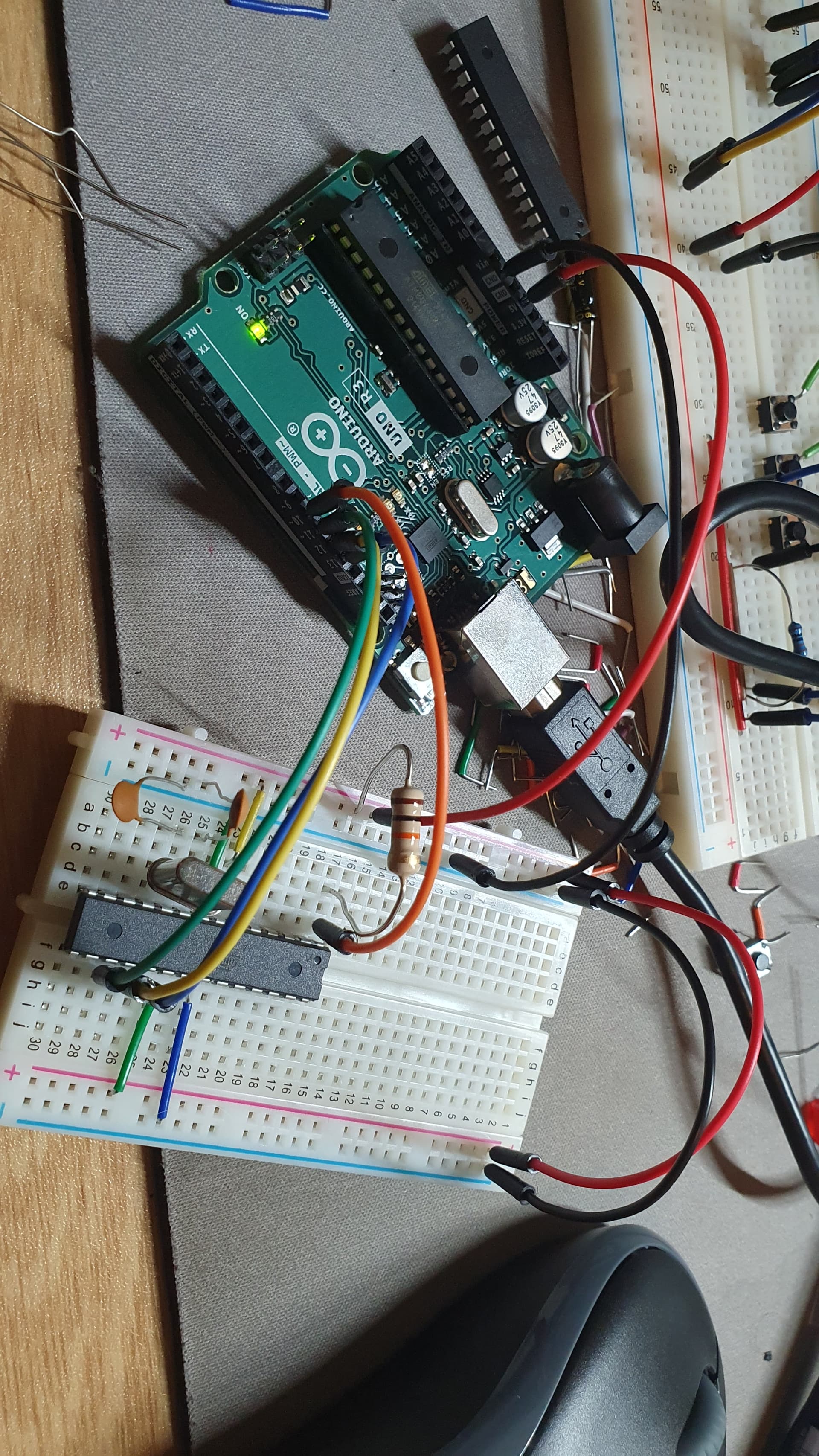
From the picture in post #3 , it seems you are using an Uno as ISP.
Have you tried connecting a 10uF cap between Reset and ground on the Uno (after uploading the ArduinoISP sketch)?
jim-p
July 22, 2024, 3:20pm
14
device signature = 0x000000
Usually indicates you have a wiring error somewhere.
I rewired the whole thing on a different breadboard with new cables and put a new 10uf capacitor between reset and gnd.
avrdude: Version 7.2-arduino.1
         Copyright the AVRDUDE authors;
         see https://github.com/avrdudes/avrdude/blob/main/AUTHORS

         System wide configuration file is C:\Users\James\AppData\Local\Arduino15\packages\MiniCore\hardware\avr\3.0.2\avrdude.conf

         Using Port                    : COM6
         Using Programmer              : stk500v1
         Overriding Baud Rate          : 19200
         AVR Part                      : ATmega8
         Chip Erase delay              : 9000 us
         PAGEL                         : PD7
         BS2                           : PC2
         RESET disposition             : possible i/o
         RETRY pulse                   : SCK
         Serial program mode           : yes
         Parallel program mode         : yes
         Timeout                       : 200
         StabDelay                     : 100
         CmdexeDelay                   : 25
         SyncLoops                     : 32
         PollIndex                     : 3
         PollValue                     : 0x53
         Memory Detail                 :

                                           Block Poll               Page                       Polled
           Memory Type Alias    Mode Delay Size  Indx Paged  Size   Size #Pages MinW  MaxW   ReadBack
           ----------- -------- ---- ----- ----- ---- ------ ------ ---- ------ ----- ----- ---------
           eeprom                  4    20   128    0 no        512    4      0  9000  9000 0xff 0xff
           flash                  33    10    64    0 yes      8192   64    128  4500  4500 0xff 0x00
           lfuse                   0     0     0    0 no          1    1      0  4500  4500 0x00 0x00
           hfuse                   0     0     0    0 no          1    1      0  4500  4500 0x00 0x00
           lock                    0     0     0    0 no          1    1      0  4500  4500 0x00 0x00
           signature               0     0     0    0 no          3    1      0     0     0 0x00 0x00
           calibration             0     0     0    0 no          4    1      0     0     0 0x00 0x00

         Programmer Type : STK500
         Description     : Atmel STK500 version 1.x firmware
         Hardware Version: 2
         Firmware Version: 1.18
         Topcard         : Unknown
         Vtarget         : 0.0 V
         Varef           : 0.0 V
         Oscillator      : Off
         SCK period      : 0.1 us
avrdude: AVR device initialized and ready to accept instructions
avrdude: device signature = 0x1e9307 (probably m8)
avrdude: Note: flash memory has been specified, an erase cycle will be performed.
         To disable this feature, specify the -D option.
avrdude: erasing chip

avrdude: processing -U flash:w:C:\Users\James\AppData\Local\Arduino15\packages\MiniCore\hardware\avr\3.0.2/bootloaders/urboot/atmega8/watchdog_1_s/autobaud/uart0_rxd0_txd1/led+b5/urboot_atmega8_pr_ee_ce.hex:i
avrdude: reading input file C:\Users\James\AppData\Local\Arduino15\packages\MiniCore\hardware\avr\3.0.2/bootloaders/urboot/atmega8/watchdog_1_s/autobaud/uart0_rxd0_txd1/led+b5/urboot_atmega8_pr_ee_ce.hex for flash
         with 364 bytes in 2 sections within [0x1e80, 0x1fff]
         using 6 pages and 20 pad bytes
avrdude: writing 364 bytes flash ...
Writing | ################################################## | 100% 0.05s
avrdude: 364 bytes of flash written
avrdude: verifying flash memory against C:\Users\James\AppData\Local\Arduino15\packages\MiniCore\hardware\avr\3.0.2/bootloaders/urboot/atmega8/watchdog_1_s/autobaud/uart0_rxd0_txd1/led+b5/urboot_atmega8_pr_ee_ce.hex
Reading | ################################################## | 100% 0.00s
avrdude: 364 bytes of flash verified

avrdude: processing -U lock:w:0xff:m
avrdude: reading input file 0xff for lock
         with 1 byte in 1 section within [0, 0]
avrdude: writing 1 byte lock ...
avrdude: 1 byte of lock written
avrdude: verifying lock memory against 0xff
avrdude: 1 byte of lock verified

avrdude done.  Thank you.
Does this mean the bootloader is on the atmega8?
Thanks for the advice... i change things see post 15
Yeah boii...
jim-p
July 23, 2024, 8:06am
19
Glad you finally got it working.
Will do. Thanks again. I thought iwas doing it right but trouble shooting that much really gave me a good understanding of how the process works