Guys i have a lcd i recently got shipped to. And i think i couldnt find help for it.
I have attached the image of the lcd and its config image as mentioned in th lcd itself .
I want to know is E =en, VEE = VO and VCC = VDD as we normally know a lcd. What is the LED+ and LED- and what is VSS
Also is there any editing i should do in my code
BTW im doing it without potentiometer
thanks to @xfpd @arduinojanuary @UKHeliBob for helping me in my last post.
link to last post
link to a Arduino interfacing with LCD
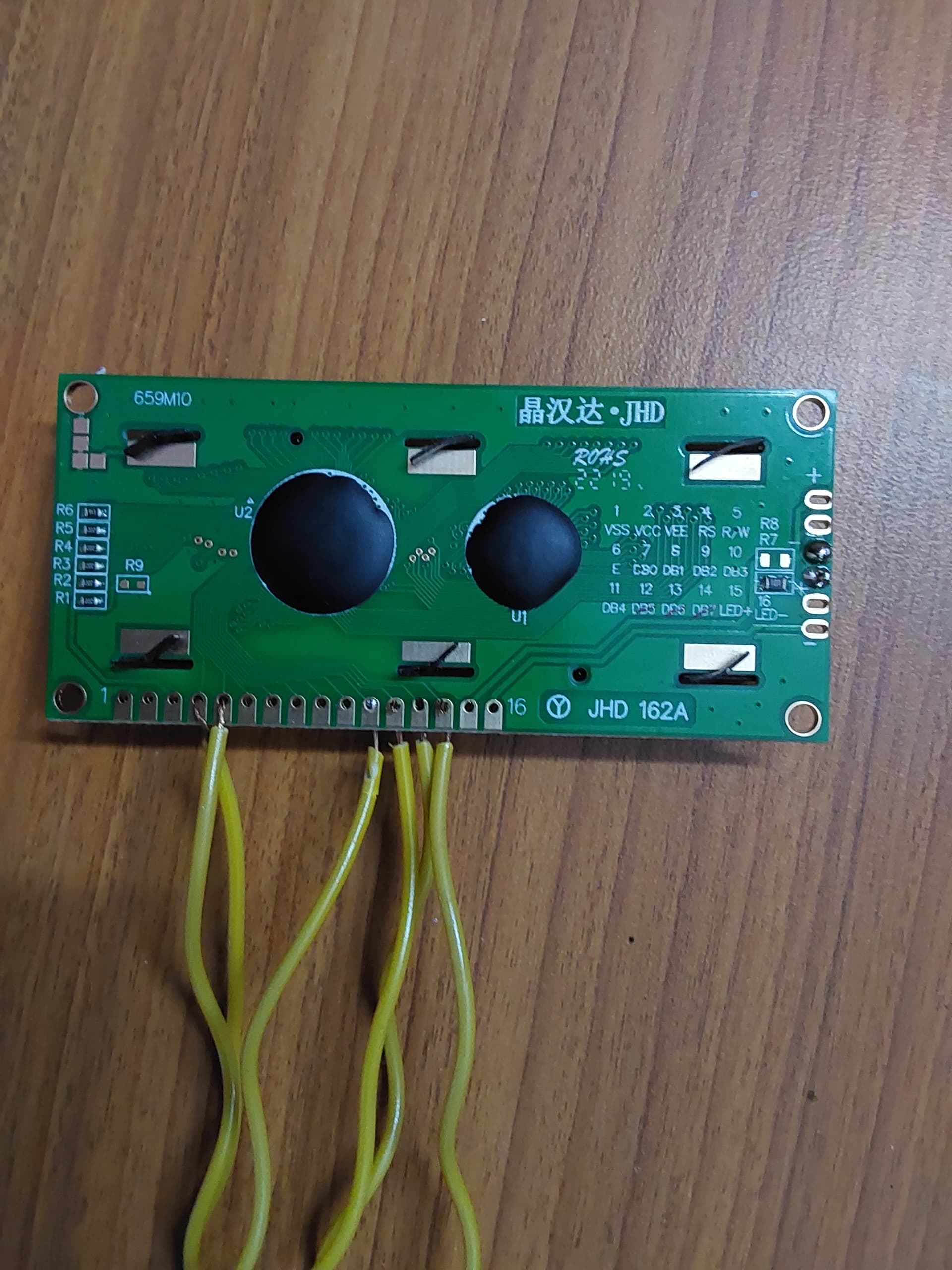

heres my code
#include <LiquidCrystal.h>
#include <dht.h>

#define dht_apin A0
dht DHT;

const int rs =12, en = 11, d4 = 5,d5 = 4,d6 = 3,d7 = 2;
LiquidCrystal lcd(rs, en, d4, d5, d6, d7);

const int sense_pin = A1;

int relay = 8;
int pump = 0;


void setup() {
  pinMode(relay, OUTPUT);
  Serial.begin(9600);
  delay(1000);
  Serial.println("Welcome to Plant Temperature reader");
  lcd.begin(16,2);
  delay(1000);
  lcd.clear();
}

void loop() {
  DHT.read22(dht_apin);


  int moist;
  int sense_apin;
  sense_apin = analogRead(sense_pin);
  moist = (100-((sense_apin/1023) * 100));

  Serial.print("Current temperature=");
    Serial.print(DHT.temperature);
    Serial.print("°C\n\n");
    Serial.print("Current Humidity=");
    Serial.print(DHT.humidity);
    Serial.print("%\n\n");
    Serial.print("Current Soil moisture=");
    Serial.print(moist);
    Serial.print("%\n\n");
    delay(1000);

  if(moist<15){

    digitalWrite(relay,HIGH);
    pump = 1;

  }
  else{

    digitalWrite(relay, HIGH);
    pump = 0;

  }


  if(DHT.temperature<60 || DHT.temperature>-30 && DHT.humidity>0){

    lcd.setCursor(0,0);
    lcd.print("Temper..=");
    lcd.setCursor(15,0);
    lcd.print("C");
    lcd.setCursor(0,1);
    lcd.print("Humidity=");
    lcd.setCursor(15,1);
    lcd.print("%");

    lcd.setCursor(9,0);
    lcd.print(DHT.temperature);

    lcd.setCursor(9,1);
    lcd.print(DHT.humidity);

    delay(2000);

    lcd.clear();

    lcd.setCursor(0,0);
    lcd.print("Soil moist=");
    lcd.setCursor(12,0);
    lcd.print(moist);
    lcd.setCursor(15,0);
    lcd.print("%");
    lcd.setCursor(0,1);
    lcd.print("Water pump");

    if(pump==0){

      lcd.setCursor(11,1);
      lcd.print("OFF");

    }

    else{

      lcd.setCursor(11,1);
      lcd.print("ON");

    }

    delay(2000);

  }

  if(DHT.temperature>60 || DHT.temperature<-30 || DHT.humidity==0){
    lcd.clear();
    lcd.setCursor(0,0);
    lcd.print("Maybe an error");
    lcd.setCursor(0,1);
    lcd.print(" has occured!");
    delay(2000);
  }


}
