Hello, I am currently working on a project where I need to use serial communication between my nodemcu and my arduino uno. I need the communication to run even without any usb connected to it, but i have not been able to find much on if it is possible, or the exact way to accomplish it. I currently have my pins 5 and 6 on my arduino uno board connected to the rx tx pins of my nodemcu, so I was wondering if it is possible if i do not use the rx tx pins. Thank you.
Yes it is, look at software serial. Keep the baud rate low(9600), don't expect high throughput, and it should work. More than a few meters, though, and TTL levels are a problem. RS232 driversand receivers needed then.
Is the nodemcu using RS232 drivers already, or just TTL levels as well?
Hello, I had to search for what RS32 drivers are, but I am not using them. So basically, the bottom line is that I can achieve serial communication if I keep the baud rate on both devices at 9600?
You can go slower if you like - eg 4800 baud - but don't go over 9600 baud if you want it to work.
Yes. Software serial, on a UNO, has speed limitations, but can be made to work if you keep your expectations low. The other advantage is, it allows you to keep using the USB/standard serial available for project debugging.
C
I have to ask, why do you need the NodeMCU to talk to the Uno.? Why can't the NodeMCU do the job alone?
Hello, It's because I'm using multiple analog inputs to calculate with, so I cant use the esp8266 alone.
Hello, your advice has been very helpful, as I was getting very worried about this. Thank you for explaining the requirement for the low baud rate as well!
One thing that other have not touched on is that the NodeMCU is a 3.3V device and the Uno is 5V. You must use a level shifter on the Uno TX to NodeMCU RX or risk blowing the NodeMCU RX pin.
It may be easier to add an external Analog to Digital converter using the NodeMCU I2C or SPI bus. Certainly more efficient.
And if you need more digital I/O there are I2C ans SPI port expanders and shift registers.
Adafruit has tutorials and example code on most all of their products. You could also check Sparkfun and Pololu to see what they offer.
@groundFungus is correct, though you may be too far along in implementation. If not, much better to keep it all on one platform.
C
you would be correct, as i already set up communication with the UART pins, but until now they were working perfectly. This might be something i need to look into, because today my serial printing does not work for some reason. Thank you @groundFungus and @camsysca !
If you really want to fix the serial comms, we can help. Post a schematic of your wiring. Post your code for the NodeMCU and the Uno. Tell us what your code actually does and how that is different from what you want. Read the forum guidelines to see how to properly post code and some good information on making a good post.
Use the IDE autoformat tool (ctrl-t or Tools, Auto format) before posting code in code tags.
The serial input basics tutorial may have information that you can use.
But, in the end, I would use external components, not another processor.
Thank you vey much for your help! I will post the code as soon as i can!
And a schematic?
That too - as soon as I find somewhere i can draw the schematic on!
Pencil and paper, photographed and posted is fine. Many members would rather see that than a Fritz type diagram.
A simple CAD program. How to make a schematic to post.
If you broke your serial, is it because you maybe changed baud for Serial,
Serial.begin(XXXX), which changes the USB serial, instead of whatever you named the software serial instance (something like SERIAL1, for example)? They don't have to be the same baud, but you must distinguish between them when setting them, and make sure that whatever the USB serial is set to is also set in the Serial Monitor window of the IDE (bottom right corner of the window).
C
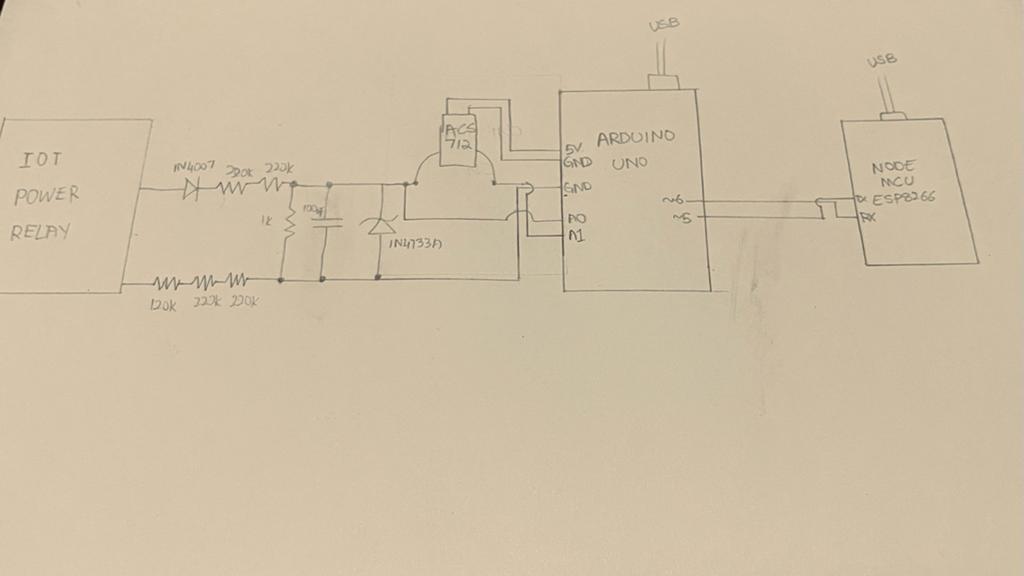
This is my schematic, hopefully you can see it.
Below is my Arduino Uno code.
#include <SoftwareSerial.h>
#define SAMPLES 300   //Number of samples you want to take everytime you loop
#define ACS_Pin A1    //ACS712 data pin analong input

float High_peak,Low_peak;         //Variables to measure or calculate
float Amps_Peak_Peak, Amps_RMS;
float p = 0;
float ACS_Value;
SoftwareSerial espSerial(5,6);

String str;
void setup(){
Serial.begin(115200);
espSerial.begin(115200);
pinMode(A0,INPUT); // set pin a0 as input pin
pinMode(ACS_Pin,INPUT);
delay(2000);
}


  uint16_t get_max() {
  uint16_t max_v = 0;
  for(uint8_t i = 0; i < 100; i++) {
    uint16_t r = analogRead(A0);  // read from analog chan  nel 3 (A0)
    //Serial.println(r);
    //Serial.println("---------------"+i);
    if(max_v < r) max_v = r;
    //if(isdigit(r) &&  max_v < r) max_v = r;
    delayMicroseconds(200);

  }
  //Serial.print ("Former Voltage"+ max_v);
  return max_v;
  }


void loop()
{

        char buf[10];
       // get amplitude (maximum - or peak value)
        uint32_t v = get_max();
       //Serial.print ("Former Voltage ");
       //Serial.print (v);
       // get actual voltage (ADC voltage reference = 1.1V)
       v = v * 1100/1023;
      // calculate the RMS value ( = peak/√2 )
      v /= sqrt(2);


      read_Amps();                               //Launch the read_Amps function
      Amps_RMS = Amps_Peak_Peak*0.3536*0.06;

      p = v*Amps_RMS;

      //Serial.print("   ac voltage  ") ; // specify name to the corresponding value to be printed
      //Serial.print(ACS_Value);
      //Serial.print(v) ; // prints the ac value on Serial monitor
      //Serial.print(",");
      //Serial.print(Amps_RMS);
      //Serial.print(",");
      Serial.print(p);//Here I show the RMS value and the peak to peak value, you can print what you want and add the "A" symbol...
      //Serial.print("\t");


      Serial.println();


     str = String(p,2);
     espSerial.print(str);
delay(100);
}


void read_Amps()            //read_Amps function calculate the difference between the high peak and low peak
{                           //get peak to peak value
  int cnt;            //Counter
  High_peak = 0;      //We first assume that our high peak is equal to 0 and low peak is 1024, yes inverted
  Low_peak = 1024;

      for(cnt=0 ; cnt<SAMPLES ; cnt++)          //everytime a sample (module value) is taken it will go through test
      {
         ACS_Value = analogRead(ACS_Pin); //We read a single value from the module


        if(ACS_Value > High_peak)                //If that value is higher than the high peak (at first is 0)
            {
              High_peak = ACS_Value;            //The high peak will change from 0 to that value found
            }

        if(ACS_Value < Low_peak)                //If that value is lower than the low peak (at first is 1024)
            {
              Low_peak = ACS_Value;             //The low peak will change from 1024 to that value found
            }
      }                                        //We keep looping until we take all samples and at the end we will have the high/low peaks values

  Amps_Peak_Peak = High_peak - Low_peak;      //Calculate the difference
}
My Nodemcu code is here:
void setup() {
// Open serial communications and wait for port to open:
Serial.begin(115200);
while (!Serial) {
; // wait for serial port to connect. Needed for native USB port only
}
}
void loop() { // run over and over
if (Serial.available()) {
  Serial.print(Serial.read());
  //Serial.println(moni);
}


}
Thats it, I think!
That is also something i will look into, later, as currently, I've run out of wires to use, but as soon as I get them, I will let you know if that's the case!
The first thing to try is to lower the software serial baud rate. As mentioned earlier none of the software serial libraries will run at 115200. The fastest that I have gotten software serial to work reliably is 38400 at most.