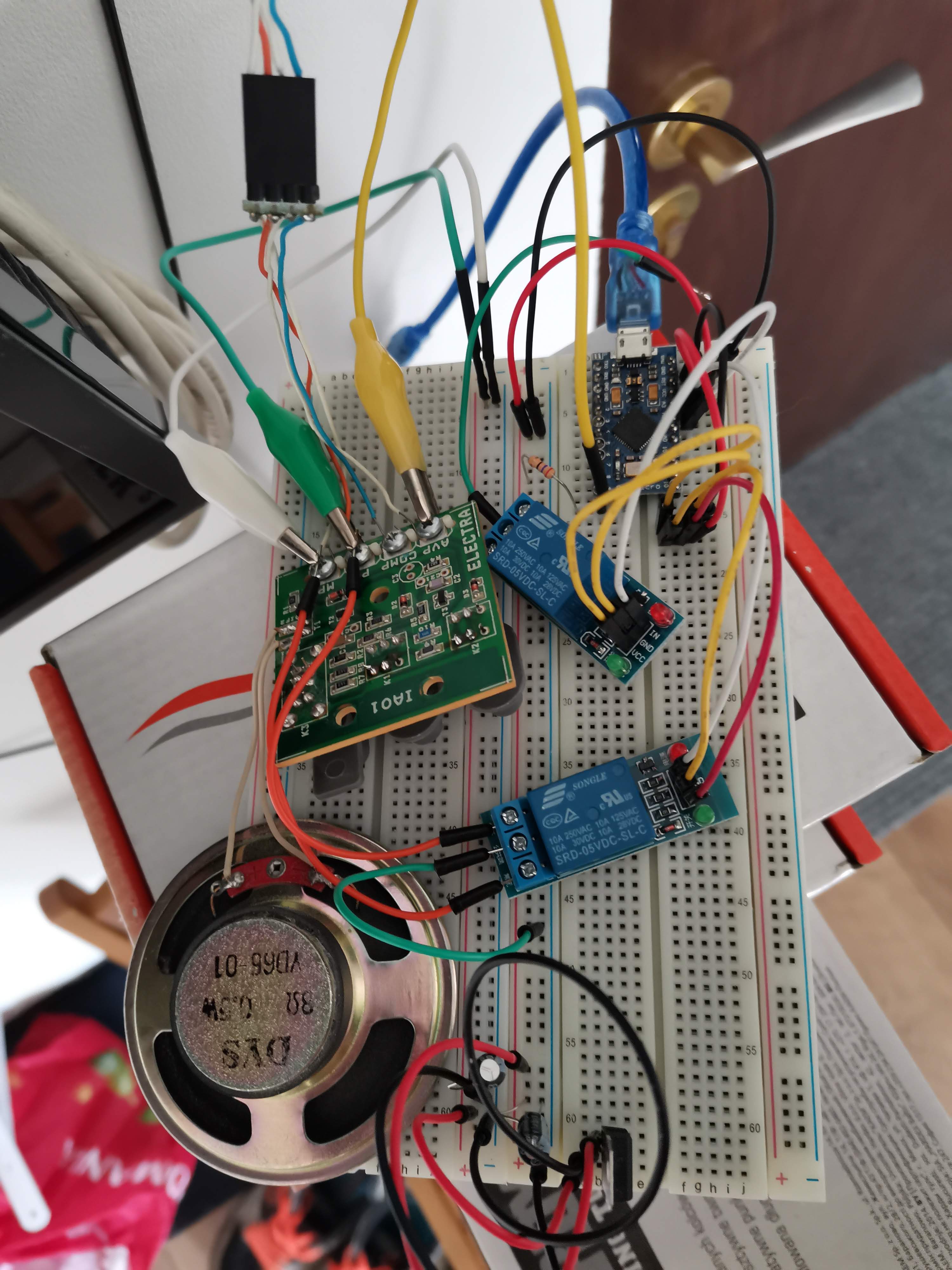
Use arduino nano for automatic open of an intercom(interphone) when dialing

Hi guys,

Maybe you can help me with the following situation.
There is an intercom installed at the entrance of the building where I live and a receiver in the flat.
When the number of the apartment is introduced the following sequence must be performed to open the external door:
-push the speak button (in this moment the ringing of the intercom stops)
-push the open button (the door of the building opens)

Before starting controlling this using a ucontroller (in my case an arduino nano) I wanted to "debug" what's happening there.

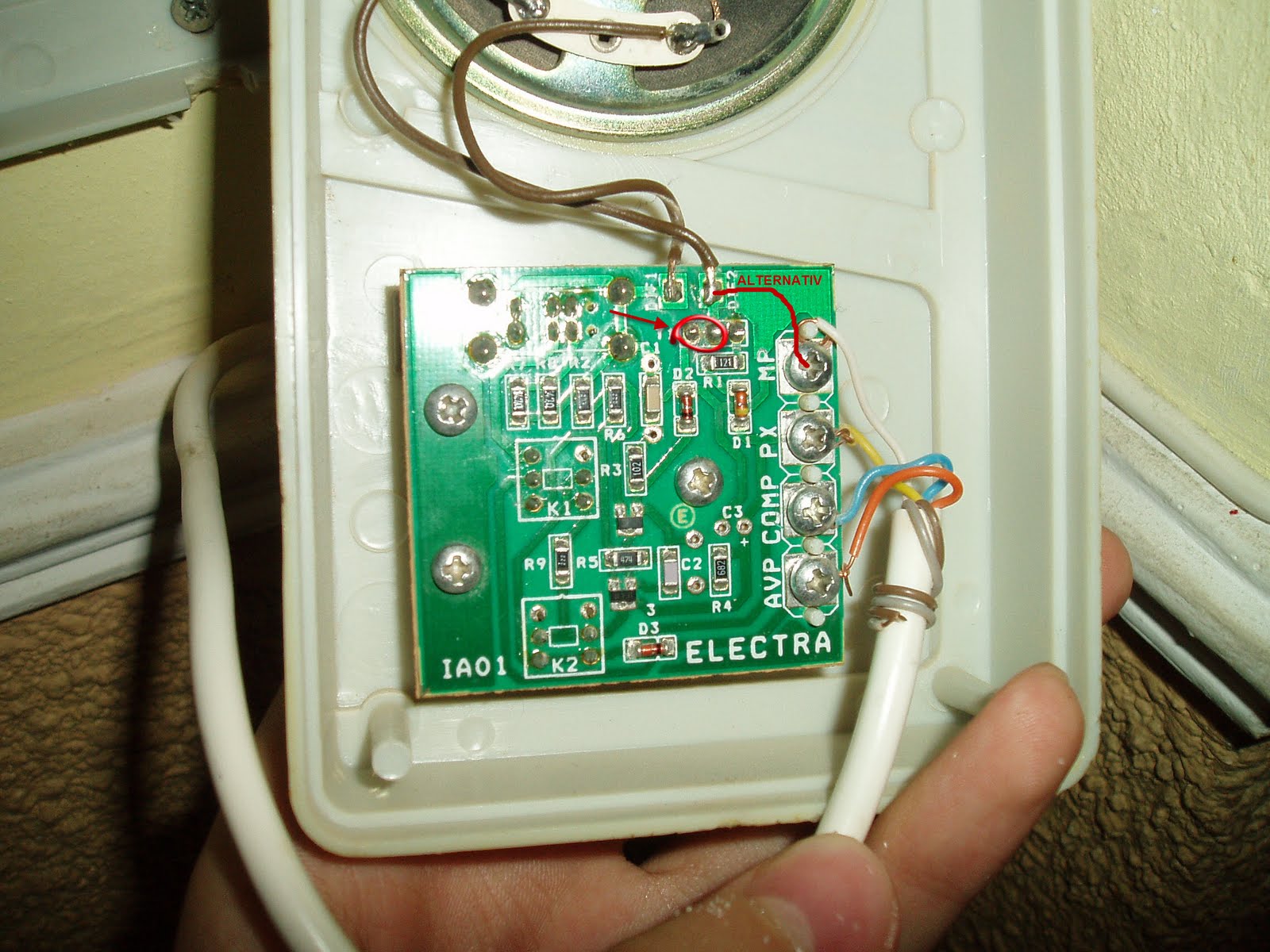
Here are two pictures of the scheme of the receiver:
-IA02-undressed (see attachment)
-IA02-circuit (see attachment)

Regarding the circuit I haven't spent to much time on it to understand every bits of functionality but rather I spent some time doing experiments.

According to the experiments the conclusions are:
MP - is the gorund
XP -is the VCC - 12 V
COMP - I didn't try any tests on it
AVP - Relay.

I made the following operations:

  • while the intercom was calling at my flat, I measured between MP and XP (and I saw the voltages above), I measured between XP and COMP and AVP and the same voltage (12V)
    I also measured between MP and -COMP and AVP: no voltage

When the talk button was pressed I measured between MP and AVP and I noticed a voltage of 5V.
Then when the open button was pressed I measured again between MP and AVP and noticed a voltage- around 5V.

Then I went on with the experiment:

  • I took a phone charger of 5V and while the interfone was calling at my flat I put the negative terminal on MP and positive terminal on AVP. The ringing stopped.
    Then without waiting a specific amount of time, I took the positive terminal off the AVP and the negative terminal off the MP and put them the following way:
    -negative terminal of charger on XP
    -positive terminal again on AVP

The result was that the door was opened.

I tried a similar experiment, keeping the positive terminal of charger on the AVP and just moving the negative between MP and XP and the result was the same - the door opened.

Another observation: I tried also to do the below operation twice (one for talk and one for open):

put

  • negative on MP
    -positive on AVP

I observed that the ring stopped when put the first time. Then when put the second time nothing
happened.

Some conclusions:

To open the door the sequence must be like this:

  • first talk then open not reversed and not even only open.
  • an impulse is necessary- to trigger talk, then to trigger open
    -it's enough to keep a positive signal (not necessary 5V, it can be lower- I even tried with 3 V and 2V)
    on AVP and just to swith the negative terminal from MP to XP.(the order is strict MP to XP)

How can this be achieved with an arduino NANO without additional circuits?
I saw that someone already did this and the connections are as follows:
-MP connected to GND
-XP connected to VIN

-AVP connected to D2

My question for this case with three cables is how the switching described earlier can be performed?
I generated a HIGH output on data D2 and the ringing stopped (this is equivalent to talk) then I generated a LOW , applied a delay of 1 sec, then reapplied HIGH -LOW sequence. The result was that
nothing happened.

As I said someone did this with three cables only.

So my final inquiry is how do I proceed with the nano?(something like a shifting negative pin or ground- the fact is that I see the result of the experiment but I do not understand very well what's happening so that I can apply the logic to the arduino device)

Any comments are appreciated.

I come back with some results. I succeded to implement the logic I was talking, but using four wires.

The connections to NANO are:
-VIN connected to XP
-GND to MP
-D2 to AVP
-D3 to XP

D2 will always output 5V on AVP, as explained in the previous post.

The talk command is possible through the path MP <-->GND<-->D2. Meanwhile D3 is set as HIGH.
The open command is simulated by sinking current through D3 while keeping D2 HIGH. (it means that for a very short delay the D3 will output 0)

So by sinking current through D3 I was able to "shift the GND" (remember the operations I was doing - moving the negative terminal of the charger between MP and XP) from MP to XP generating thus the second impulse needed to open the gate.

I am still curious how can this be achieved using only three wires connected to GND VIN and D2

Connecting 5v Nano GPIO pins directly into a 12 volt circuit does not seem very wise.
I personally would have used a 2 channel relay module to simulate directly the pressing of the two buttons. I’d use in addition, 2 diodes and a resistor.
The path 11.7 volts (PX) - 2.2k - diode 1 - AVP momentarily to simulate the push to talk.
The path 11.7 volts (PX) - diode 2 - AVP afterwards to simulate push to open.

If I was your landlord and discovered your messing with the intercom, you would be out the next day. Read you contract carefully.

Paul

I would suggest this to minimise the interference with the existing system :

For full fidelity, you'd have to break the "listen" path during the operation of the push to talk relay, but I doubt if that makes a difference, except maybe hearing a click in the loud speaker.

Hi,

Thanks for the schematics and for the suggestions of using the relays. Going back to the NANO, a resistor or a diode on the D3 would not protect the NANO from the voltage on XP which is out of 0-5v range?

You've said this:

The connections to NANO are:
-VIN connected to XP
-GND to MP
-D2 to AVP
-D3 to XP [ I guess you mean PX ]

In your diagram, PX is marked as 11.7 volts so should not be connected directly to a Nano.

AVP appears to get a potential of about 11 volts (because of the diode voltage drop) but also dependent on (a) the internal resistance of the 11.7 volts supply and (b) the resistance of whatever is connected afterwards to AVP (Releu etc.). You might get away with connecting this to a Nano. I don't know.

A diode could, under some circumstances, help protect an Arduino pin from 11.7 or so volts, but the pin could not then be used to pull down to zero volts. This may or may not matter in your case.

Anyway, I would avoid any integration between the Nano and any external circuit, unless isolated by relay contacts especially in this case where it is not all clear.

Thanks for the advices.

I agree with the suggestion to replace the two buttons with a 2-channel relat module.

Am still unsure what I will say to the landlord when I move out regarding the wires I ran (network and cable between two floors). Like, I did him a favor, but he wont like that we just did it.

:slight_smile:

The connection is locally in the terminal from the flat. It will be easily deactivated and unmounted. Nothing is changed in the main infrastructure.(and the call to the flat will not be routed on this automatized path - all the time)

@rududoo, hello!

I'm trying to do the same thing as you did but on a Electra IA01 (which seems to be almost the same thing with the IA02) circuit board, coupled with an Arduino Pro Micro 5v. My experience with electronics is really limited, but I can get around existing Arduino code.

I hooked the Arduino Pro Micro 5V to a Zener diode and LM7805 so that it will be running only when there is proper voltage, then got two LEDs working on pins 20 & 21, but I don't really understand how to sink those voltages like you said.

Any chance you could share the code that you used for solving this, be it with 3 wires or 4 ?

I'm trying to stay away from the two channel relays because I want this to be as small and using as fewer parts as possible.

After I get the talk/open done, I'd like to extend this with an ESP8266 module (hooked up with LM317 and probably another Zener for the Arduino's TX) so that I may trigger the door opening using my phone, but this is more a question of coding the commands using the module than anything else.

Thank you!

rududoo:
Hi guys,

Maybe you can help me with the following situation.
There is an intercom installed at the entrance of the building where I live and a receiver in the flat.
When the number of the apartment is introduced the following sequence must be performed to open the external door:
-push the speak button (in this moment the ringing of the intercom stops)
-push the open button (the door of the building opens)

Before starting controlling this using a ucontroller (in my case an arduino nano) I wanted to "debug" what's happening there.

Here are two pictures of the scheme of the receiver:
-IA02-undressed (see attachment)
-IA02-circuit (see attachment)

Regarding the circuit I haven't spent to much time on it to understand every bits of functionality but rather I spent some time doing experiments.

According to the experiments the conclusions are:
MP - is the gorund
XP -is the VCC - 12 V
COMP - I didn't try any tests on it
AVP - Relay.

I made the following operations:

  • while the intercom was calling at my flat, I measured between MP and XP (and I saw the voltages above), I measured between XP and COMP and AVP and the same voltage (12V)
    I also measured between MP and -COMP and AVP: no voltage

When the talk button was pressed I measured between MP and AVP and I noticed a voltage of 5V.
Then when the open button was pressed I measured again between MP and AVP and noticed a voltage- around 5V.

Then I went on with the experiment:

  • I took a phone charger of 5V and while the interfone was calling at my flat I put the negative terminal on MP and positive terminal on AVP. The ringing stopped.
    Then without waiting a specific amount of time, I took the positive terminal off the AVP and the negative terminal off the MP and put them the following way:
    -negative terminal of charger on XP
    -positive terminal again on AVP

The result was that the door was opened.

I tried a similar experiment, keeping the positive terminal of charger on the AVP and just moving the negative between MP and XP and the result was the same - the door opened.

Another observation: I tried also to do the below operation twice (one for talk and one for open):

put

  • negative on MP
    -positive on AVP

I observed that the ring stopped when put the first time. Then when put the second time nothing
happened.

Some conclusions:

To open the door the sequence must be like this:

  • first talk then open not reversed and not even only open.
  • an impulse is necessary- to trigger talk, then to trigger open
    -it's enough to keep a positive signal (not necessary 5V, it can be lower- I even tried with 3 V and 2V)
    on AVP and just to swith the negative terminal from MP to XP.(the order is strict MP to XP)

How can this be achieved with an arduino NANO without additional circuits?
I saw that someone already did this and the connections are as follows:
-MP connected to GND
-XP connected to VIN

-AVP connected to D2

My question for this case with three cables is how the switching described earlier can be performed?
I generated a HIGH output on data D2 and the ringing stopped (this is equivalent to talk) then I generated a LOW , applied a delay of 1 sec, then reapplied HIGH -LOW sequence. The result was that
nothing happened.

As I said someone did this with three cables only.

So my final inquiry is how do I proceed with the nano?(something like a shifting negative pin or ground- the fact is that I see the result of the experiment but I do not understand very well what's happening so that I can apply the logic to the arduino device)

Any comments are appreciated.
Hi! I'm interested about this project to use it on my personal intercom. Can I have your code in private message? If it is necessary I will pay for it.

Looking for your reply. Thank you!

So, this is my fifth try at least. Laughably.

First few times -not counting the relay tries- I tried just with an Arduino Micro Pro like @rududoo said, but alas, no luck. Then tried with relays like @6v6gt said, sadly with no luck either as the push buttons are 6 pin and the while the access one can be triggered by a relay, I find that the talk one cannot, as the "left" part and the "right" part of the button have to be triggered in what it seems to be a reversed way.

Again, Arduino code would be much appreciated.

Best!

So it's got 6 pins on it? Probably a double pole double throw switch; they make relays like that, that would be a drop-in replacement. Though with the way prices are distorted by the mass market for the most common hobby rlectronics shit, it might be cheaper to just use 2 channels of a 4-channel relay unit to replace that one switch.

Your connections to the relay contacts look odd. One appears to use all 3 contacts (c,no,no) and one , although partly hidden, appears to have only ‘c’ connected.
Anyway, before you get as far as connecting relays, just simulate what the relay contacts would do by using jumpers to see if that works.
If you get it working with jumpers, then it will be relatively simple to design the additional circuit required and the Arduino code.

@DrAzzy, @6v6gt, thank you for your feedback!

Trying the relay approach was just to see if I have some success as an encouragement in continuing, because even if I succeed with the relays I would not be able to fit them in my project's maximum space/size.

What I tried with the relays is hook up AVP to LM7805 5v continuously after 1s, and switch the GND between MP and PX (even added a diode to ensure PX doesn't send current backwards).

I still have to figure out a way of replicating what @rududoo already accomplished, i.e. Arduino (in my case Pro Micro) connected directly to the IA01 wires, eventually using a Zener and LM7805 for proper voltage. I will continue trying and post when I have new findings.

What is very hard is testing my circuit and code, I have to walk down and up four stories to test a configuration. This at least has its fitness advantage, haha, but is a bit frustrating too.

Best, Alex.

Hi, i tried this project but instead of arduino, i used an ESP-01 (i want to let myself in using my phone). On the bench it works perfectly. But when i try to power it from the PX and MP pins the voltage drops to 4.8V
The ESP and regulator draw about 55mA. For now I only managed to make it work with an external power suply. Is there anyway to make it work with its original power source?
Thanks

If you have actually got this working, albeit with an external power supply, then publish your circuit diagram and maybe code as well. It could also help those attempting to repeat this project.

I got this working and opening the door automatically using a Arduino Micro Pro & MIC2981/82YN and a few other passives, thanks to @6v6gt and others on Help to identify IC(some kind of logic to analog voltage output switch) [SOLVED] - General Electronics - Arduino Forum

I will post a schematic and code next week.

A bit later than promised, but here is my solution. I am unable to provide a nice schema for this, but the info below will cover the circuit.

Scope: Trigger door open on Electra IA01 (and probably IA02) intercoms when intercom post number is called.

Breadboard explanation
Components:

  • Arduino Pro Mini (as "Arduino");
  • MIC2981/82YN (as "IC") http://ww1.microchip.com/downloads/en/DeviceDoc/mic2981.pdf;
  • 4.7K resistor;
  • BA159 diode.
    External wires:
  • black is GND from IA01 MP wire;
  • red is Vs from IA01 PX wire;
  • and blue is signal from IA01 AVP wire.
    Connections:
  • Vs which is around 12v-13v is connected to the Arduino RAW pin and to Vs of IC;
  • GND is connected to one of Arduino's GND pins and GND of IC;
  • Arduino A1 pin is connected to IC pin 3 (IN3);
  • Arduino A3 pin is connected to IC pin 1 (IN1);
  • IC pin 18 (OUT1) is connected to a 4.7K resistor then to the BA159 diode;
  • IC pin 16 (OUT3) is connected directly to the BA159 diode;
  • BA159 diode is connected (forward bias) to the AVP wire.

This is the Arduino code

// Trigger open door on Electra IA01 (and probably IA02) intercoms when post is called using an Arduino Pro Micro, 
// MIC2981/82YN, a 4.7K resistor and a BA159 diode.

// first pin, output goes through 4.7K resistor, then to BA159 diode.
const int outToResistor = A3;
// second pin, output goes directly to BA159 diode.
const int outToDirect = A1;

void setup() {
  pinMode(outToResistor, OUTPUT);
  pinMode(outToDirect, OUTPUT);

  openDoor();
}

void openDoor(){
  delay(2500);
  
  digitalWrite(outToResistor, HIGH);
  delay(1200);
  digitalWrite(outToResistor, LOW);    
  delay(1200);
  
  digitalWrite(outToDirect, HIGH);
  delay(1200);
  digitalWrite(outToDirect, LOW);
}

void loop() {
}

Code explanation
When the interior post number is called the following things happen:

  • Arduino powers up and waits 2.5s;
  • it then commands the IC to allow input voltage through the 4.7K resistor and BA159 diode to AVP wire for 1.2s;
  • it waits another 1.2s;
  • then commands the IC to allow input voltage this time directly to AVP wire for 1.2s;
  • door opens.

Some notes on the struggles and conclusions I had along the way, much of this is guesswork as I am a beginner:
I have a working circuit with an Arduino Nano, an unknown IC, 2.2K resistor and a 1N4007 diode, but it was not done by me and I did not know anything about it (source Automatizări interfoane where there are more circuits available to buy for Electra intercoms so if you need a ready made auto open solution for Electra you may buy one from there and save yourself the hassle).
While trying to replicate this circuit with Arduino Pro Mini, I tried using NPN PMOS high-side switches, but the door would not open despite the fact that the switches were triggering properly.
Then when I got the MIC2981/82YA, I tried it with the Arduino Pro Mini and still no luck, despite the IC was sending the signals properly.

Then I found out that the signals to AVP must be over 11.7V as stated in the intercom manual on https://www.a2t.ro/source/ELECTRA_CARTE_TEHNICA.pdf on page 30 figure B, and with the Arduino Pro Micro and 1N4007 I was just shy of 11.7V.
I presume there was too much of a voltage drop in the Arduino Pro Micro itself compared to the Arduino Nano, and that is why using the 1N4007 diode with Vf 670mV did not work, but using the BA159 diode with Vf 630mV worked (these are measured values, apparently the datasheets specify something else, then again I won't vouch for the quality of my parts).