Weird MCU_Friend 2.4" touchscreen issue

Hi all

Got one of those MCU_friend 2.4" TFT touchscreens...

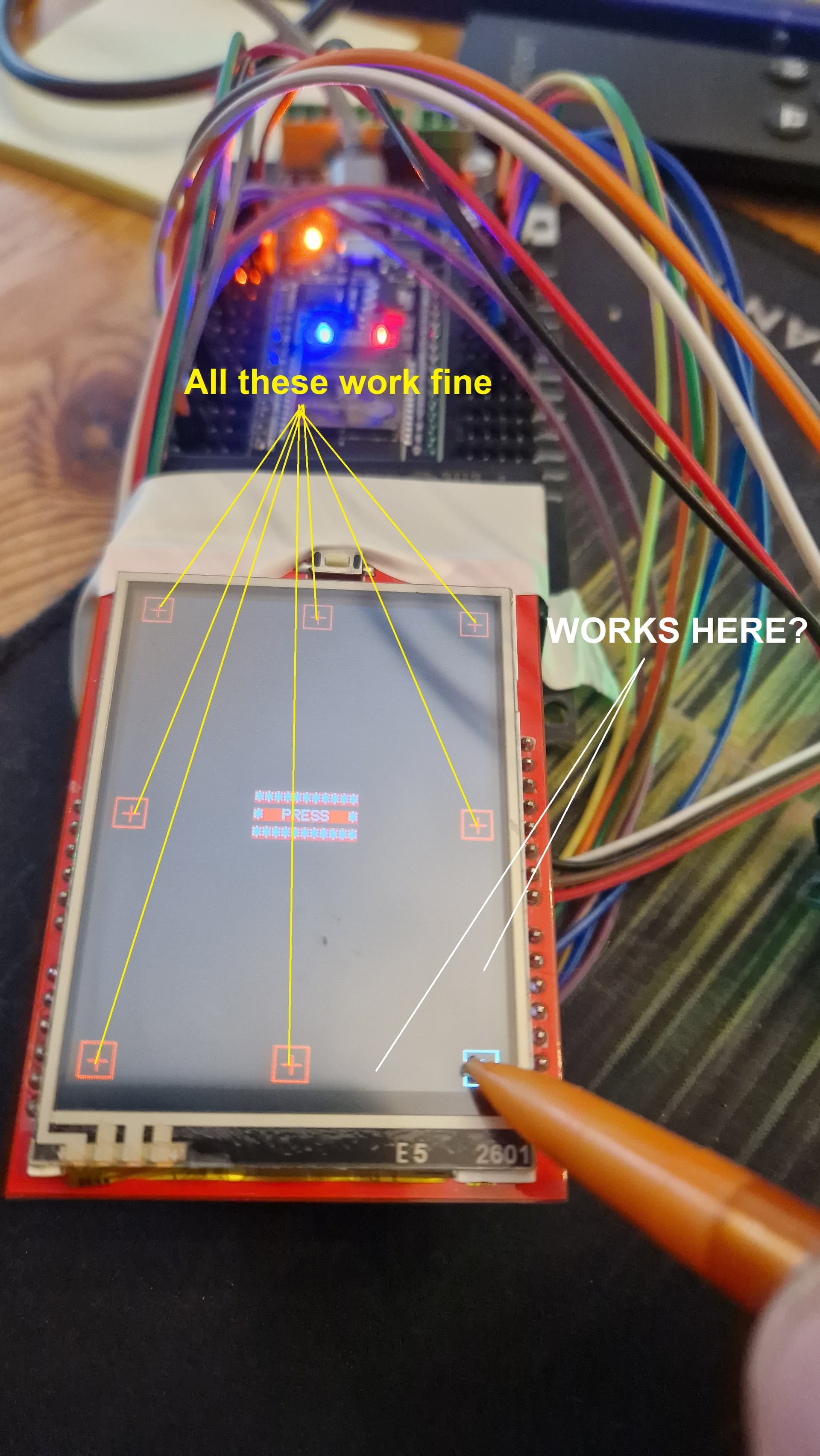
The touchscreen calibration runs fine for 8 of the 9 points (in both landscape and portrait).
But the final touch point doesn't respond until you move about 10mm in from the point (in either axis).

Don't quite understand how that can be if the other 8 points work fine?
Touchscreen seems to be working (resistance is fine).


Using touchscreen_Calib_native (which worked right out the box).

This seems like some variable somewhere might be preventing the detection until is it under a certain value?

Any ideas?

Line 78...

state = tp.z > 200; //ADJUST THIS VALUE TO SUIT YOUR SCREEN e.g. 20 ... 250

I have tried all different values here (how do you work out the correct one?)

Nearer 0 will make it detect the press on the cross, but then it never says release.

You always find it after posting in here.

That line 78 is repeated on line 279. But is doesn't say to adjust it here.

Setting tp.z to 20 on both of those lines fixes it.

WHAT is the point of saying on line 78 to adjust as required (without any comment as to why or what it does) and then making no reference to the same action being required further down the code.

Having real time wasting issues with shoddy libraries lately. I am not clever enough to write my own, but the amount of problems I seem to face lately with poor, incorrect or glitchy libraries (and massively incorrect Googled information - usually wiring diagrams) is driving me mad.

The internet is fast becoming a mess of incorrect data

I know I am going to get shafted for saying that and appearing ungrateful, but.... annoying nonetheless.

Hi @baffled2023,

I understand your frustrations... but ...

  • Would it be interesting and satisfying to get always the solution offered on a silver plate?
  • It was not the library but an example program that checked your ability to read and understand code.

:wink:

Take it as a challenge, never trust the internet in the first place, always use your own brain (as you obviously did successfully!).

This specific case shows that using hardcoded numbers in software can cause avoidable problems. A constexpr with a self-explanatory name would have been a nicer solution.

I'm confident that the author of the example is open for a (friendly) request for amendment.

Hope you have a smile on your face again and keep on coding!

ec2021

I know.... I should be very grateful for these libraries to exist at all ... and I am.
However, it's getting to the point of spending so much time getting basic things to work that it takes away all the enjoyment.

Us noobs get berated in here for not commenting code etc, and I just don't understand why most (but not all) libraries appear to have such unintuitive commenting or information.

To type ' //ADJUST THIS VALUE TO SUIT YOUR SCREEN e.g. 20 ... 250' means absolutely nothing unless you understand what you are adjusting it for. Is it resistance?, range of values?, size of your feet?, current exchange rate?
A few extra words in that line would have explained it far better.

Plus... further down the code on line 279, when he basically typed in the same line, would you have not thought.... 'Now maybe I should set this as a value in setup then seeing as it's called more than once, so this actually works?' or... just put in the comment on line 78 that line 279 needs editing as well.

Anyway... all a bit mute.

The touchscreen calibration now works fine, but when I run it with the simple buttons test, it is detecting a screen press constantly and therefore doesn't work.
Can't figure that out.

The resistive screen shares pins with the LCD and I suspect some kind of clash (even though the LCD test is fine as well)

That is normal for this type of display, there are barely enough pins for the screen since the display is designed to fit an UNO and needs additional pins for the SD card. Something else that is problematic when using the display on an UNO is that the RST (reset) line for the display is on pin A4, which interferes with using the I2C bus.

The z value is usually depending on the pressure applied. In other applications you may find this

   do
   {
      q = ts.getPoint();
      delay(10);
   } while( q.z < MINPRESSURE || q.z > MAXPRESSURE );

where MINPRESSURE and MAXPRESSURE are "#define" values and must be determined empirically.

You could simply write a small sketch that reads and displays the z-data via the serial interface. Apply different pressures and use the max/min values obtained.

There is another very common problem with tft touchscreen shields that occurs when the gfx lib uses some shared pins as output while the touchscreen software configures them as inputs. Usually concerning the analog pins:

#define YP A3  // must be an analog pin, use "An" notation!
#define XM A2  // must be an analog pin, use "An" notation!

So after calling getPoint() one has to reconfigure both as outputs (pinmode(..., OUTPUT)) for the gfx libs. Otherwise people get white screens ... :wink:

This is on an ESP32 (Connections in my first post).

Its not the pressures.... tried that. They are within the detected values states in the calibration test.

XM and YP are both analogue pins.

I will have to abandon this then. I can't spend hours/days again this week trying to make this work.

I spent literally 3 days last week trying to make a DMX library work (which in the end was a library glitch that someone fixed for me).

#if 1

#include <Adafruit_GFX.h>
#include <MCUFRIEND_kbv.h>
MCUFRIEND_kbv tft;
#include <TouchScreen.h>
#define MINPRESSURE 200
#define MAXPRESSURE 1000

// ALL Touch panels and wiring is DIFFERENT
// copy-paste results from TouchScreen_Calibr_native.ino
//const int XP = 6, XM = A2, YP = A1, YM = 7; //ID=0x9341
//const int TS_LEFT = 907, TS_RT = 136, TS_TOP = 942, TS_BOT = 139;

const int XP = 14, XM = 4, YP = 15, YM = 27; //240x320 ID=0x0154
const int TS_LEFT = 947, TS_RT = 146, TS_TOP = 57, TS_BOT = 973;

TouchScreen ts = TouchScreen(XP, YP, XM, YM, 300);

Adafruit_GFX_Button on_btn, off_btn;

int pixel_x, pixel_y;     //Touch_getXY() updates global vars
bool Touch_getXY(void)
{
  Serial.println("Button pressed...");
  TSPoint p = ts.getPoint();
  pinMode(YP, OUTPUT);      //restore shared pins
  pinMode(XM, OUTPUT);
  digitalWrite(YP, HIGH);   //because TFT control pins
  digitalWrite(XM, HIGH);
  bool pressed = (p.z > MINPRESSURE && p.z < MAXPRESSURE);
  if (pressed) {
    pixel_x = map(p.x, TS_LEFT, TS_RT, 0, tft.width()); //.kbv makes sense to me
    pixel_y = map(p.y, TS_TOP, TS_BOT, 0, tft.height());
  }
  return pressed;
}

#define BLACK   0x0000
#define BLUE    0x001F
#define RED     0xF800
#define GREEN   0x07E0
#define CYAN    0x07FF
#define MAGENTA 0xF81F
#define YELLOW  0xFFE0
#define WHITE   0xFFFF

void setup(void)
{
  Serial.begin(9600);
  uint16_t ID = tft.readID();
  Serial.print("TFT ID = 0x");
  Serial.println(ID, HEX);
  Serial.println("Calibrate for your Touch Panel");
  if (ID == 0xD3D3) ID = 0x9486; // write-only shield
  tft.begin(ID);
  tft.setRotation(0);            //PORTRAIT
  tft.fillScreen(BLACK);
  on_btn.initButton(&tft,  60, 200, 100, 40, WHITE, CYAN, BLACK, "ON", 2);
  off_btn.initButton(&tft, 180, 200, 100, 40, WHITE, CYAN, BLACK, "OFF", 2);
  on_btn.drawButton(false);
  off_btn.drawButton(false);
  tft.fillRect(40, 80, 160, 80, RED);
  Serial.println("Online");
}

/* two buttons are quite simple
*/
void loop(void)
{
  bool down = Touch_getXY();
  on_btn.press(down && on_btn.contains(pixel_x, pixel_y));
  off_btn.press(down && off_btn.contains(pixel_x, pixel_y));
  if (on_btn.justReleased())
    on_btn.drawButton();
  if (off_btn.justReleased())
    off_btn.drawButton();
  if (on_btn.justPressed()) {
    on_btn.drawButton(true);
    tft.fillRect(40, 80, 160, 80, GREEN);
  }
  if (off_btn.justPressed()) {
    off_btn.drawButton(true);
    tft.fillRect(40, 80, 160, 80, RED);
  }
}
#endif

This doesn't work at all even when the touchscreen calibration data is declared.
The screen appears, but the touchscreen doesn't work.

The 'bool Touch_getXY(void)' routine gets called constantly... not sure if it should or not

At least the button_simple examples gives you an obvious place to adjust the values:

[code]

#include <TouchScreen.h>
#define MINPRESSURE 200
#define MAXPRESSURE 1000

I don't recall, does the calibration sketch print out the pressures values that you are getting from the screen? It would help to know the actual numbers.

Something to take note of, the following code needs to be used whenever you call getPoint() in order to set the pins back to the mode needed for the display:

    TSPoint p = ts.getPoint();
    pinMode(YP, OUTPUT);      //restore shared pins
    pinMode(XM, OUTPUT);
    digitalWrite(YP, HIGH);   //because TFT control pins
    digitalWrite(XM, HIGH);

That is the way it should be. A touch of the screen can only be detected at the time getTouch() is called, same as a button press can only be detected when you call digitalRead(). Not calling the function often enough causes you to have to press the screen for a noticeably long time before the press is recognized.

Yes, you get pressures:

cx=943 cy=176 cz=683  X, Y, Pressure
cx=553 cy=189 cz=581  X, Y, Pressure
cx=84 cy=177 cz=434  X, Y, Pressure
cx=941 cy=556 cz=606  X, Y, Pressure
cx=91 cy=556 cz=327  X, Y, Pressure
cx=953 cy=908 cz=498  X, Y, Pressure
cx=548 cy=913 cz=352  X, Y, Pressure
cx=83 cy=922 cz=101  X, Y, Pressure

const int XP=14,XM=4,YP=15,YM=27; //240x320 ID=0x0154
const int TS_LEFT=947,TS_RT=146,TS_TOP=57,TS_BOT=973;
*** COPY-PASTE from Serial Terminal:

PORTRAIT  CALIBRATION     240 x 320
x = map(p.x, LEFT=947, RT=146, 0, 240)
y = map(p.y, TOP=57, BOT=973, 0, 320)

LANDSCAPE CALIBRATION     320 x 240
x = map(p.y, LEFT=57, RT=973, 0, 320)
y = map(p.x, TOP=146, BOT=947, 0, 240)

It's not that.

If I add a print command in the touch routine...

bool Touch_getXY(void)
{
  TSPoint p = ts.getPoint();
  pinMode(YP, OUTPUT);      //restore shared pins
  pinMode(XM, OUTPUT);
  digitalWrite(YP, HIGH);   //because TFT control pins
  digitalWrite(XM, HIGH);
  bool pressed = (p.z > MINPRESSURE && p.z < MAXPRESSURE);
  if (pressed) {
    Serial.println("PRESSED");
    pixel_x = map(p.x, TS_LEFT, TS_RT, 0, tft.width()); //.kbv makes sense to me
    pixel_y = map(p.y, TS_TOP, TS_BOT, 0, tft.height());
  }
  return pressed;
}

The touch screen is working, but only in the bottom left 10mm x 10mm patch... not as it does in the calibration routine.

Thats because your only printing pressed if its within the min and max pressure

Test what the raw pressure values are when not touched and touched on various parts of the screen

You need to adjust min and max pressure to suit

TSPoint p = ts.getPoint();
  pinMode(YP, OUTPUT);      //restore shared pins
  pinMode(XM, OUTPUT);
  digitalWrite(YP, HIGH);   //because TFT control pins
  digitalWrite(XM, HIGH);
  
   Serial.println(p.z);
    
  return pressed;

No that not it... the pressure is fine. I already printed out the pressure and that works as it should.

The touch screen is only detecting a tiny area bottom left of the screen. Something is wrong with the way the min/max values are being applied to the dimensions of the touch area.

If you adjust the values (const int TS_LEFT = 947, TS_RT = 146, TS_TOP = 57, TS_BOT = 973;) which SHOULD be the ones from your calibration, the resulting co-ords are wildly out.
They are being adjusted incorrectly elsewhere.

Anyway.... it's just not worth the time.

I have a Nextion touchscreen here that I know works. Madly expensive, but I don't have to rely on janky libraries for it to work

You might need to check the library documentation to see if it is compatible with the ESP32.

You would think that if the calibration routine runs fine in the examples, and the graphics demo runs fine, and the text demo runs fine, then the library is compatible.

Doesn't say anywhere (that I can see) that it's not compatible, just that the touch pins need to be analogue (which they are).

They just don't work together

Anyway... whole day wasted. It's dismantled and I have moved on

Its not the library
The screen isnt specifically an mcufriend screen. Mcufriend is a library written by david prentice (who has since passed away) that covers many different displays, display controllers and micro controllers.

Hes put thousands of hours into this and was bery helpful with it.

Many of these lcd displays are cheap chinese ones. They have different communication methods as well as different touch methods, resisitve values, sharing of pins etc. Hes done an amazing job.

For what its worth if your serious about your project get a decent display with capacitive touch. Its a lot more accurate and also reads multitouch, generally up to 5 touches at once.

1 Like

This topic was automatically closed 180 days after the last reply. New replies are no longer allowed.